Posts

Showing posts from 2021

Building LOD Models for Unity in Blender
Image
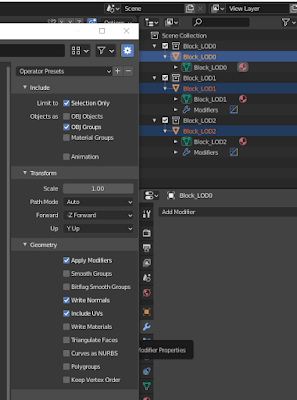
1) Name your original collection, model, and mesh NAME _LOD0 2) Duplicate the collection for each LOD level, namking the new collections, models, and meshes the appropriate LOD number (i.e. _LOD1, _LOD2, etc.) 3) Increasingly lower the poly count on each LOD model, either manually by merging vertices, or using the decimate modifier and lowering the ratio progressively 4) Select just the meshs of each collection and export to OBJ 5) Deselect "OBJ Object" and select "OBJ Groups" 6) When you import this object into Unity, the LOD levels will show up automatically and you can adjust the camera distance for each LOD from the UI as desired

Unity: VR Head Blocking (Oculus Integration)

Image
VRHeadBlocking.cs: using System.Collections; using System.Collections.Generic; using UnityEngine; // VR Head Blocking Script (Synaptic Response) // For use with Unity + Oculus Integration (v23.1) // Add this script to the CenterEyeAnchor component of the OVRCameraRig // If your player component has colliders set its label to "Player" // Initial Implementation: Scott Lupton (02.17.2021) public class VRHeadBlocking : MonoBehaviour { public GameObject player; private int layerMask; private Collider[] objs = new Collider[ 10 ]; private Vector3 prevHeadPos; private float backupCap = . 2f ; private void Start () { layerMask = 1 << 8 ; layerMask = ~layerMask; prevHeadPos = transform.position; } private int DetectHit (Vector3 loc) { int hits = 0 ; int size = Physics.OverlapSphereNonAlloc(loc, backupCap, objs, ...

Normalization and Sine "Hop" Transformation

Image
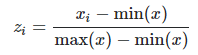
  Normalization: Can be used to convert a value x into a normalized range between 0-1. Sine "Hop" Transformation: sin(Pi*x) Translate a Sine curve "hop" using a value x in the range of 0-1.

Steam: Clear Achievements

1)  Press Win + R 2) Enter:  steam://open/console 3) Enter: achievement_clear <appID> <achievementCode>